Palworld
Survival · Crafting · Creature Collecting · Crossplay
- Plans from 8 to 32 players, the game's maximum per server
- Updated for Palworld 1.0
- Crossplay for Steam, Xbox and PS5 players
- One-click UE4SS install for PC mods
- High-clock AMD Ryzen & EPYC hardware
- Nightly offsite backups and DDoS mitigation included
Choose Your Server Plan
All plans include DDoS mitigation, nightly backups, free web hosting, and 24/7 expert support. No hidden extras.
Ryzen & EPYC CPUs at 4.5 GHz. Right for most groups, vanilla worlds and light mods.
Our fastest CPUs, 5.0 GHz+. Palworld's server leans hard on CPU speed, and every Pal working at a base adds to the load. Pick Extreme for big bases, lots of players online at once or mods, so the world keeps running smoothly when it's busy.
- Normal hardware, 4.5 GHz
- 9 GB RAM
- ~100 GB NVMe SSD
- DDoS mitigation
- Nightly Backups
- Free Web Hosting
- Normal hardware, 4.5 GHz
- 12 GB RAM
- ~100 GB NVMe Pro SSD (5x faster)Our faster NVMe drives. The world loads quicker and saves are less likely to cause a stutter.
- DDoS mitigation
- Nightly Backups
- Free Web Hosting
- Normal hardware, 4.5 GHz
- 15 GB RAM
- ~100 GB NVMe Pro SSD (5x faster)Our faster NVMe drives. The world loads quicker and saves are less likely to cause a stutter.
- DDoS mitigation
- Nightly Backups
- Free Web Hosting
- Extreme hardware, 5.0 GHz+Our fastest CPUs at 5.0 GHz+, for the most headroom with big builds and a full server.
- 9 GB RAM
- ~100 GB NVMe SSD
- DDoS mitigation
- Nightly Backups
- Free Web Hosting
- Extreme hardware, 5.0 GHz+Our fastest CPUs at 5.0 GHz+, for the most headroom with big builds and a full server.
- 12 GB RAM
- ~100 GB NVMe Pro SSD (5x faster)Our faster NVMe drives. The world loads quicker and saves are less likely to cause a stutter.
- DDoS mitigation
- Nightly Backups
- Free Web Hosting
- Extreme hardware, 5.0 GHz+Our fastest CPUs at 5.0 GHz+, for the most headroom with big builds and a full server.
- 15 GB RAM
- ~100 GB NVMe Pro SSD (5x faster)Our faster NVMe drives. The world loads quicker and saves are less likely to cause a stutter.
- DDoS mitigation
- Nightly Backups
- Free Web Hosting
Dial in exactly what you need.
- Your choice of player slots
- Normal or Extreme hardware
- Your choice of RAM
- NVMe or NVMe Pro SSD
- CPU priority up to Realtime
- DDoS mitigation
- Nightly Backups
- Free Web Hosting
48-hour money-back guarantee on all plans.
48-Hour Free Trial
Full access. No restrictions. Try the complete service. If it isn't right for you, no charge and no questions asked.
Palworld Screenshots
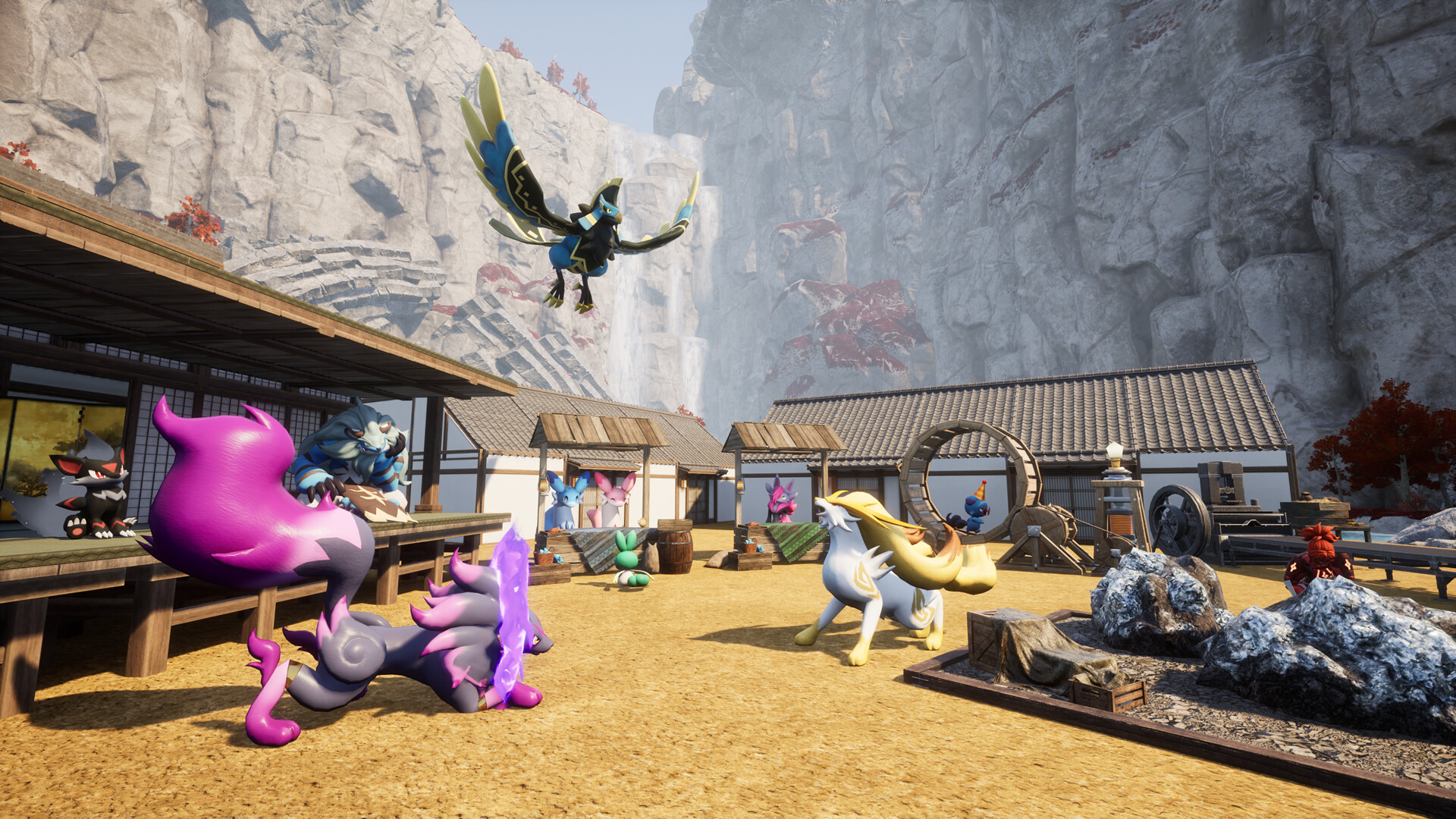


Everything You Need to Run Your Server
Steam, Xbox and PS5 on One Server
Palworld dedicated servers support crossplay, so friends on Steam, Xbox and PlayStation 5 can share one persistent world. Choose which platforms can join in your server settings, or switch crossplay off for a PC-only server.
- Steam, Xbox and PS5 players together
- Console players join through the in-game community server list
- Turn crossplay on or off in the Gamepanel, see our crossplay guide
Tune Every Rate and Rule
Edit PalWorldSettings.ini from the Gamepanel to set the world up the way your group plays. Speed up capture and breeding for a casual server, or make it harder for a challenge.
- XP, capture, egg hatching and drop rates
- Day and night length, difficulty and death penalty
- PvP on or off, see our PvP guide
- Server name and password, see our settings guide
UE4SS in One Click
Most Palworld mods run on the Unreal Engine Scripting System (UE4SS). Install it from the Gamepanel Mod Manager in one click, then upload your mods over FTP or the file manager.
- One-click UE4SS install
- Full FTP and SFTP access
- Players need the same mods on their PC, see our mod guide
- Mods are PC-only: keep a crossplay server vanilla
Full Control at Your Fingertips
Our custom-built Gamepanel puts every server function one click away. Start, stop, restart and monitor your server from any browser, with no SSH or technical knowledge required.
- GUI and text config file editors
- Web-based live console
- RCON for remote commands, see our RCON guide
- Scheduled restarts and updates
Your Pals, Always Protected
Our offsite disaster recovery system backs up every server nightly at 4AM server time. If a save corrupts or a mod breaks something, we can restore your world quickly.
- Nightly automated offsite backups
- Manual backup and restore anytime
- One-click world wipe for a fresh start
- Bring your single-player world, see our save upload guide
One Subscription, Any Game
Don't cancel, just switch. Move your server to any of 250+ supported games whenever you like. Your slots and billing cycle carry over.
- 250+ games in the catalogue
- All slots and settings transfer
- No cancellation or new order needed
The Best Choice for Your Server
Deployed automatically. Gamepanel credentials in your inbox in under 10 minutes.
Ryzen & EPYC CPUs chosen for highest single-core speed. High-speed DDR5 RAM, picked for stability.
Real technicians, 24/7/365. Typical response under 10 minutes. Backed by 1,500+ knowledgebase articles.
Hand-picked gaming datacenters with low, stable ping, wherever your crew is based.
Every server comes with free web hosting. Build a community hub, forums, or announcements page.
Change the game your server runs at any time, no cancellation, no new order required
Nightly offsite backups at 4AM server time. Restore your progress if a save corrupts.
High-capacity, always-on DDoS mitigation, constantly updated to counter new attack vectors.
Backup, restore, wipe, automated updates, mod management, all in one fast, purpose-built panel.
Not happy within 48 hours? Full refund. No questions asked. Zero risk to try us.
Full file access via your preferred FTP client. Upload mods, configs, and plugins securely.
Datacenters chosen specifically for the lowest, most stable latency. Lag is our enemy too.
Why Not Just Run It Yourself?
You can run Palworld yourself. Here's what that actually looks like next to a rented server.
About Palworld
Palworld is an open-world survival and crafting game from Pocketpair in which players catch creatures called Pals, then fight, farm, build and work alongside them across the Palpagos Islands. Pals aren't just companions in battle: assign them to your base and they'll mine, log, craft, cook and generate power while you explore.
Palworld entered Early Access on 19 January 2024 and became one of the biggest launches on Steam, selling more than eight million copies there in under six days. Pocketpair reported more than 32 million players across PC and consoles by its first anniversary. Crossplay between PC and consoles arrived in March 2025, including on dedicated servers.
Version 1.0 left Early Access on 10 July 2026. It added 72 new Pals, bringing the total to 287, two new regions in the floating Sunreach islands and the endgame World Tree, a level cap raised from 65 to 80, and new systems including Mutations through breeding and Awakening with Radiant Gems.
A dedicated server keeps your world online when the host isn't playing, so everyone's bases keep running and your Pals keep working. With up to 32 players per server, big bases full of working Pals and lots of players exploring at once, single-core speed and RAM both matter.

Useful Palworld Links
The official site, the store page and the main places Palworld players go for news and mods.
How to Join Your Palworld Server
Your server's IP address and port are in the Gamepanel under Connection Info as soon as it's online.
On PC (Steam)
- Copy your server's IP address and port from the Gamepanel.
- Launch Palworld and choose Join Multiplayer Game.
- Paste the IP address and port into the connection box at the bottom of the screen and click Connect.
- Enter your server password if you've set one.
Can't connect, or can't see your server in the list? See our connection guide.
On Xbox and PS5 (crossplay)
- Make sure crossplay is enabled for those platforms in your server settings.
- Remove any mods. Console players can't use PC mods.
- In Palworld, open Join Multiplayer Game and search the community server list for your server's name.
- Select it, enter the password if there is one, and join.
Our crossplay guide covers the settings. Saves and characters don't carry across platforms.
Popular Palworld Guides
Step-by-step help from our knowledgebase for setting up and running your server.
Other Games You Might Like
Other survival and crafting games we host. Switch anytime by submitting a ticket. Or take the Survival Game Bundle and switch between them yourself from the Gamepanel, with your saves kept.





Trusted by Thousands of Gamers
Amazing Help from Stefan. The customer service was great and answered all my questions as well setting up my Dedicated server with the mods I wanted.
Really recommend this company. The last few days they have helped me set up my Rust server! Stuff I couldnt do they set it up for me. Really highly recommend! 10/10
I currently run Empyrion, Ark and TS3 servers with Pingperfect.com and can't say enough good things about their service and support. The servers run fast and trouble free, well except for the Ark server but that's the developers and modders causing the problems there. The few times I have needed help the support team has been quick and helpful.
i have had nothing but good experiences on ping perfect.Really responsive support team who are beyond helpful and more than polite. their service is easy to navigate and has anything you could possibly need. loving ping perfect.
Been with Pingperfect for a solid 2,5 years now and been hosting servers for Killing Floor, always quick on the tickets, servers are always running and with a good performance. They have been expanding and keep improving their whole company so 5/5 for PingPerfect!
20 locations, One Low Ping
All locations include DDoS mitigation, nightly backups & 24/7 support.
Test Your Ping to Our Locations
Unsure which location is closest to you? Run a latency test to all of our server locations and see the results first-hand. Results are sorted from lowest to highest ping automatically.
Frequently Asked Questions
How do I join my Palworld server?▾
On PC, choose Join Multiplayer Game and enter the IP address and port from your Gamepanel in the box at the bottom of the screen. Xbox and PS5 players find the server by name in the community server list, once crossplay is enabled. The full steps are in the how to join section above.
How many players can join a Palworld server?▾
Up to 32 players, the most a Palworld dedicated server supports. Our plans cover 8, 16 and 32 players, each on Normal or Extreme hardware. Extreme's faster CPUs help keep big worlds full of working Pals running smoothly.
Is my server updated for Palworld 1.0?▾
Yes. Servers update from the Gamepanel, and you can schedule automatic updates so the server stays on the same version as your players after each patch.
Will my Early Access save work in 1.0?▾
Existing saves carry over, but 1.0 adds new regions, Pals and systems, so many groups choose a fresh world. Our Gamepanel can back up your current world and wipe it in one click, so you can keep the old save in case you want it back.
Can Xbox and PS5 players join my server?▾
Yes. Palworld dedicated servers support crossplay between Steam, Xbox and PS5. Console players join through the in-game community server list. See our crossplay guide.
Can I use mods on my Palworld server?▾
Yes, on PC. Install UE4SS from the Mod Manager in one click, then upload your mods. Every player needs the same mods installed on their own PC. Console players can't use PC mods, so keep a crossplay server vanilla. See our mod guide.
Can I upload my single-player world?▾
Yes. Upload your save via FTP or the file manager. Only the world transfers, not your player character, so you'll create a new character on the server. Our save upload guide covers the steps.
Can I change XP, capture and breeding rates?▾
Yes. Edit PalWorldSettings.ini from the Gamepanel to change experience, capture, egg hatching and drop rates, day length, difficulty and much more. See our settings guide and config file reference.
How do I make my server PvP?▾
Switch PvP on in your server settings and restart. Our PvP guide has the steps.
How do I add an admin or set a password?▾
Set an admin password in the Commandline Manager, then type /AdminPassword followed by that password in game. See our admin guide, admin commands and server password guide.
How much does a Palworld server cost?▾
Plans start from $12.28/month for an 8-player server with 9 GB RAM. The 16-player, 12 GB plan is our most popular. Every plan is also available on Extreme hardware with faster 5.0 GHz+ CPUs. Every plan comes with a 48-hour free trial.
What payment methods are accepted?▾
- Credit and debit cards, Apple Pay and Google Pay, processed securely by Stripe
- PayPal
- Skrill, using your Skrill wallet or a bank transfer
Need another method? Contact us and we'll do our best.
What currencies does PingPerfect accept?▾
We natively support USD, GBP, and EUR. Other currencies work too — your bank may apply a small conversion fee.
What level of support is included?▾
All plans include 24/7/365 ticket support with a typical response under 10 minutes, plus 1,500+ knowledgebase articles. Platinum managed support is available as an optional upgrade. See our support levels page.
What hardware do you use?▾
Ryzen and EPYC CPUs for highest single-core performance, paired with DDR5 RAM chosen for stability. Full specs on our hardware page.
Can I migrate my existing server to PingPerfect?▾
Yes. Transfer via FTP/SFTP yourself, or open a support ticket and our team will walk you through it.
Start Your Palworld Server Today
Deploy in under 10 minutes. Updated for 1.0, crossplay for Xbox and PS5, one-click UE4SS for mods. 48-hour money-back guarantee.