
It is very easy to enable PVP on your PingPerfect Palworld server, simply follow the steps below.
- First of all, stop the server.
- In the control panel click Configuration Files
- Modify the PalWorldSettings.ini using the Text Editor
- Search for and set the following two options to True
bIsPvP=TruebEnablePlayerToPlayerDamage=True - Save the file and then you can start the server again.
In some cases the above steps may not work if you have been playing on an existing save game, not an issue, simply follow the process below to correct this and enable PVP.
- Stop the server once more.
- In the control panel click Configuration Files
- Modify the PalWorldSettings.ini using the Text Editor
- Copy the entire contents of the file and then paste it into this website: https://palworldoptions.com/
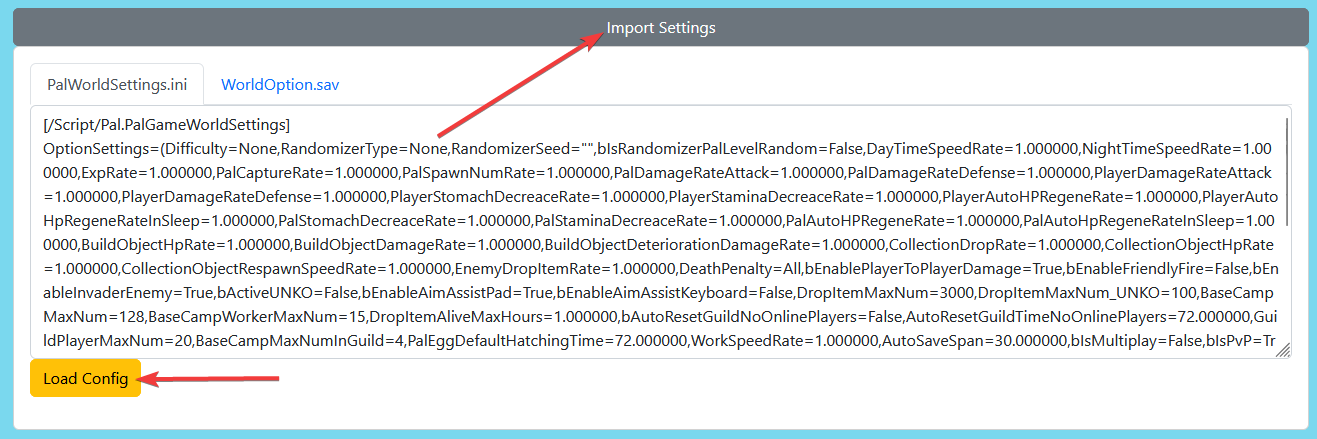
- Once loaded you can scroll to the very bottom and click the "Generate WorldOption.sav" button

- Locate the file this has downloaded and then you need to upload this into the following location on your server:
Pal > Saved > SaveGames > 0 > PingperfectServerSaveDataYou can do this using either the control panel file manager or an FTP program of your choice - Accessing your files - Once uploaded you are all done, start the server and PVP should be enabled.
Looking for a game server host known for brilliant 24/7 customer support and quality hardware?
Try a Pingperfect Palworld server today! https://pingperfect.com/gameservers/palworld-server-hosting
