
Want to continue your single player or co-op world on your Pingperfect Enshrouded Server? Just follow the steps below.
Note: Your character, inventory and skills are saved on your own PC, so your character will carry over automatically when you join the server. Only the world needs to be uploaded.
Step 1: Find your local world files
- Press
Windows + R, paste in the location below and press Enter.
Steam Cloud saves (most common):
C:\Program Files (x86)\Steam\userdata\YOUR_steamID3\1203620\remote
Get your steamID3 from here: https://steamid.io/lookup
Local / non-cloud saves:
C:\Users\YOUR_USERNAME\Saved Games\Enshrouded
- Find your world save files. They have hexadecimal names such as
3ad85aea, along with matching files that end in_info,-indexor_info-index. - If you have played recently, sort by 'Date modified' to find the right set of files. Copy all of the files that belong to your world to a safe folder on your PC.
Step 2: Stop your server and back up the existing world
- Log in to your control panel and stop your server. It must be fully stopped, otherwise it may overwrite the files you upload.
- Open the 'File Manager' (or connect with an FTP client such as FileZilla) and go to the
savegamefolder. - Download a copy of the files currently in the
savegamefolder as a backup. You can use them to restore your server's original world if you need to.
Step 3: Upload your world
- Delete the existing server-generated save files from the
savegamefolder. - Upload your world files into the
savegamefolder. - Make sure the file names match what the server expects. The main save file for the first slot is named
3ad85aea. If your files have a different name, rename the base name to3ad85aeaand keep the endings (_info,-index,_info-index) exactly as they were.
Example:
3ad85aea 3ad85aea_info3ad85aea-index3ad85aea_info-index
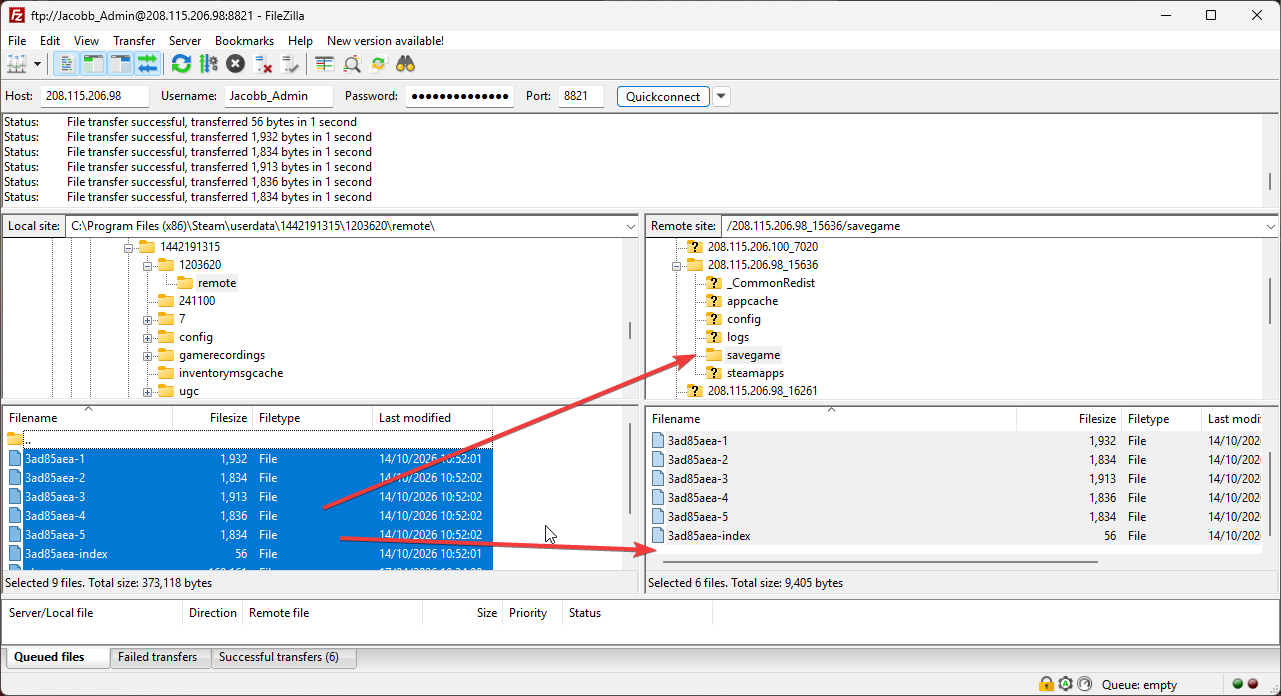
Step 4: Start your server
- Start your server from the control panel.
- Join the server in game and your world will load.
Troubleshooting
- World does not load: Check that the file names match exactly, including the endings, and that the server was fully stopped before you uploaded.
- Missing files: Make sure you copied every file that belongs to your world, not just the main one.
- New empty world is loading: The server could not use the files you uploaded. Stop the server, check the file names in the
savegamefolder and start it again. - Still stuck: Restore your backup from Step 2 and contact our support team using the link below.
Looking for a game server host known for brilliant 24/7 customer support and quality hardware?
Try a Pingperfect Enshrouded server today! https://pingperfect.com/gameservers/enshrouded-server-hosting