
It is really easy to install mods to your PingPerfect Hytale server, simply follow the steps below.
A popular source of Hytale mods is CurseForge, you can browse them here: https://www.curseforge.com/hytale
Streamlined Method:
- In your control panel click the Curse Mods button.

- This will list all available mods for Hytale, you can search for any specific mod you'd like, install and uninstall particular versions from this page.

- Click install for the mod you would like to use, restart the server and you are done!
Manual Method:
- Any mod that you download should provide you with a .jar file, keep this handy as you will need it.
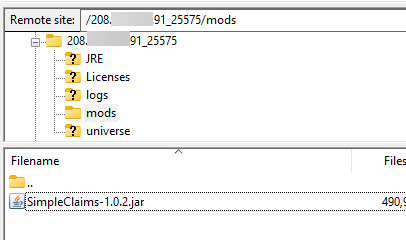
- With this .jar file, it needs to be uploaded to the mods folder on your server.
You can do this with either FTP or the control panel File Manager: https://pingperfect.com/knowledgebase/19/Accessing-your-files--File-manager--FTP--SFTP.html - For example this is how it would look with one mod installed:
- Restart your server to load the new mod, as soon as you connect it will load and you are all done, enjoy!
If you have any questions please don't hesitate to reach out to our support team here, we are available 24/7 and happy to assist https://pingperfect.com/contact
Looking for a game server host known for brilliant 24/7 customer support and quality hardware?
Try a Pingperfect Hytale server today! https://pingperfect.com/gameservers/hytale-game-server-hosting
