
- In your control panel, click Configuration Files.
- Edit the
R5\ServerDescription.jsonfile, labelled Main Server Config. - Tick the
Password Protected?checkbox, and finally insert the password you would like into theServer Passwordtext box.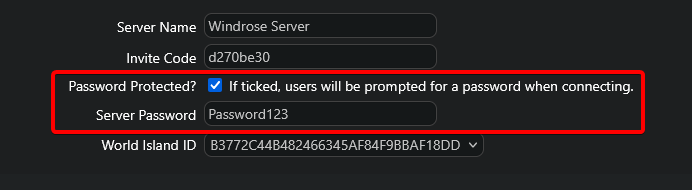
- Save your changes and start the server, it will now prompt you for a password when connecting.
Looking for a game server host known for brilliant 24/7 customer support and quality hardware?
Try a Pingperfect Windrose server today!
https://pingperfect.com/gameservers/windrose-server-hosting
