
To cluster your Soulmask servers you will require two servers, one for each map. Simply follow these steps to perform the clustering process:
Game Panel Configuration Steps:
- On your first server, go into the commandline manager and select the preset commandline named "Main Server of Cluster".
You can modify any of the server details here that you require such as the server name and passwords.
Whilst you are here, please take note of the main server port displayed in your commandline as this is required for the second server.
- Now on the second server, go into the commandline manager and select the alternative commandline named "Secondary Server of Cluster".
If you plan to play the DLC map on this server be sure to change this in the specified setting toDLC_Level01_Main
For this commandline you must insert the IP of your primary server and the main server port you have noted earlier into the labelled text box.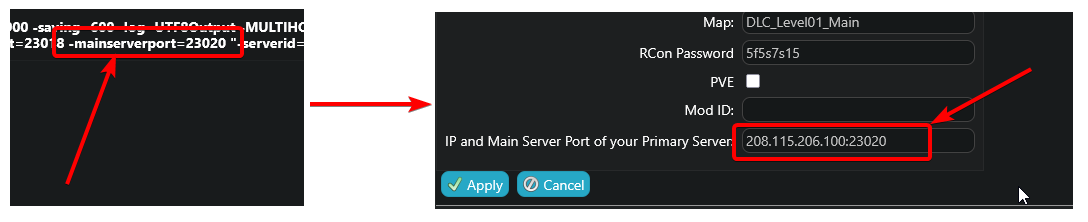
- The clustering is now complete, you can save your changes and start both servers.
If you would like to be able to transfer your characters between both servers, please continue and perform the following steps:
In Game Configuration (Enable Character Transfers)
Please take note of the admin password for your servers, as you will require this to access the settings menu in game.
- Please perform the process in our guide here to access your admin menu in game: Soulmask | How to become admin / administrator
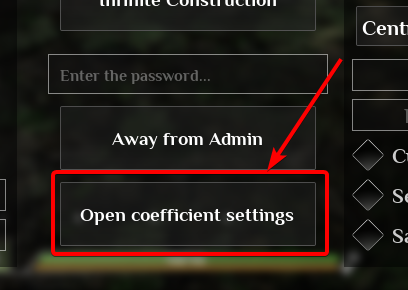
- Click the button labelled "Open coefficient settings"
- On the right side menu, scroll down until you see "Cross-server Mode" and tick this option to enable character transfers.
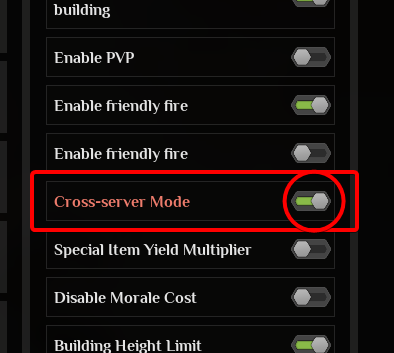
- Perform the same process on your other server and you can now transfer your characters between your cluster.
- To transfer your character to the other server you will need to go to the mysterious island on the map and interact with the terminal.
Soulmask | How To Transfer Character Between Clustered Servers
Looking for a game server host known for brilliant 24/7 customer support and quality hardware?
Try a Pingperfect Soulmask server today!
https://pingperfect.com/gameservers/soulmask-server-hosting
